




Scorecard Mapping
The Scorecard Mapping page provides a guide for integrating a scorecard into a strategy in the Strategy Designer module. Mapping a scorecard ensures that all its variables and criteria are correctly aligned with the input data or calculated variables, enabling accurate calculations during the decision-making process.
Steps to Map a Scorecard to a Strategy
Step 1: Add a Scorecard to the Strategy
- Open the Strategy Designer module.
- Locate the workflow point where you want to integrate the scorecard.
- Right-Click on the connection point in the strategy flow and select Add Scorecard.
- Choose the desired scorecard model from the list of available models.
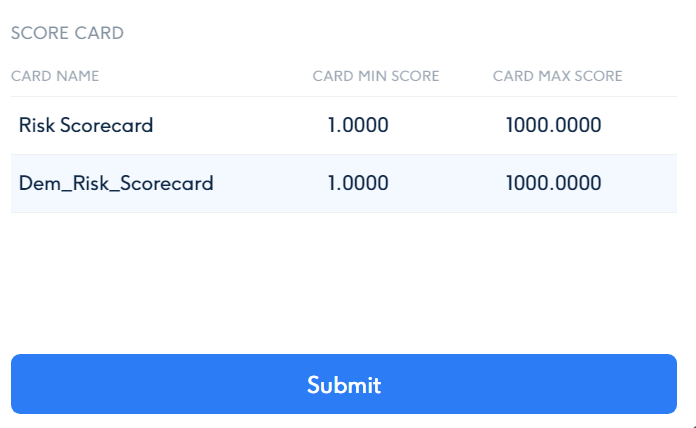
Step 2: Map Scorecard Variables to Inputs
-
Open the Mapping Panel:
- After selecting the scorecard, a mapping panel will open, displaying the scorecard variables (e.g., Age, Employment Status, Credit History, Debt-to-Income Ratio) on the right side and available input elements on the left-top panel.
-
Drag and Drop to Map:
- Drag input variables from the left-top panel and drop them onto the corresponding scorecard variables.
- Example Mapping:
- Scorecard Variable: Age → Input Variable: Applicant’s Age.
- Scorecard Variable: Employment Status → Input Variable: Applicant’s Job Title or Employment Type.
- Scorecard Variable: Credit History → Input Variable: Applicant’s Credit Score or Past Defaults.
- Scorecard Variable: Debt-to-Income Ratio → Input Variable: Applicant’s Total Debt and Income Data.
-
Handle Missing Variables:
- If a required variable (e.g., Age) is not available in the input data:
- Navigate to the Variable Section in the left panel.
- Create or use an existing Calculated Variable to derive the required value.
- Examples:
- Age =
Current Date - Date of Birth. - Debt-to-Income Ratio =
Total Debt ÷ Total Income.
- Age =
- If a required variable (e.g., Age) is not available in the input data:
-
Map Calculated Variables:
- Drag the calculated variable to the scorecard variable to complete the mapping.
Step 3: Verify and Finalize
-
Review the Mapping:
- Ensure all scorecard variables are correctly mapped to input or calculated variables.
- Double-check that the mapped items align with the scorecard model’s requirements.
-
Submit:
- Once all mappings are complete, click Submit to save the configuration.
- Save the updated strategy to ensure the scorecard integration is applied.
Example: Mapping a Loan Eligibility Scorecard
Scenario:
- Scorecard Variables:
- Age
- Employment Status
- Credit History
- Debt-to-Income Ratio
- Input Variables:
- Applicant’s Age
- Applicant’s Employment Type
- Applicant’s Credit Score
- Applicant’s Debt and Income Data
Steps:
- Add the Scorecard:
- Add the Loan Eligibility Scorecard to the strategy workflow.
- Map Variables:
- Age → Map to
Applicant’s Age. - Employment Status → Map to
Applicant’s Job TitleorEmployment Type. - Credit History → Map to
Applicant’s Credit Score. - Debt-to-Income Ratio → Calculate as
Total Debt ÷ Total Income, then map to the scorecard variable.
- Age → Map to
- Handle Missing Data:
- If Employment Status is missing, create a calculated variable based on:
- Job title classification or employment category (e.g., full-time, part-time, unemployed).
- If Employment Status is missing, create a calculated variable based on:
Best Practices for Scorecard Mapping
- Ensure Complete Mapping:
- All scorecard variables must be mapped to either input or calculated variables.
- Validate Calculations:
- Test the strategy with sample data to ensure all mappings and calculations are correct.
- Use Descriptive Variable Names:
- Clearly name input and calculated variables to avoid confusion during mapping.
Benefits of Scorecard Mapping
- Dynamic Integration:
- Use scorecards dynamically in strategies for accurate and automated decision-making.
- Flexible Variable Handling:
- Map missing variables using calculated fields, ensuring scorecard functionality is preserved.
- Scalability:
- Seamlessly integrate multiple scorecards into a single strategy for complex workflows.
Mapping scorecards to strategies ensures accurate data alignment and effective decision-making within Scorport.



