




My Plans
Accessing Your Plan
-
Where to Find My Plan:
- In the upper section of the Scorport platform, near your Profile, you’ll see the "My Plan" button.
- Clicking this button will open a detailed view of your assigned plan and its features.
-
Assigned Plan:
- Upon logging in, you will be assigned to a default plan (e.g., Free Trial or Starter Plan) depending on your subscription type.
Plan Details
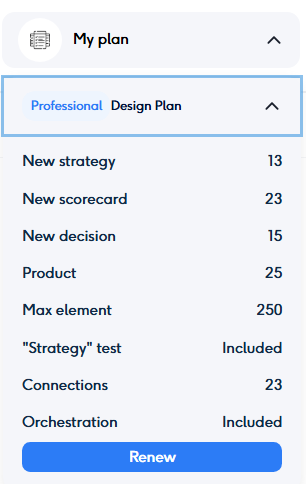
When you access your plan, the system will display:
- The name of your plan (e.g., Beginner (Trial), Basic, Expert, Professional).
- A breakdown of the opportunities and limitations of your chosen plan.
- Key details include:
- Maximum number of strategies allowed in your account.
- Connection limits: The number of external services you can integrate.
- Max element allowance: The total number of elements you can include in a single strategy.
Plan Comparison
- Each plan offers unique advantages, such as higher allowances for strategy creation, external connections, and maximum elements.
- Upgrading to a higher plan unlocks additional features and provides greater flexibility for complex decision engine designs.
Upgrading Your Plan
- You can upgrade your plan at any time by selecting a higher-tier package in the My Packages section.
- Note: Downgrading your plan is not allowed. Once a strategy is created, its characteristics—such as the number of elements and functional opportunities—are tied to your current plan. To ensure smooth platform usage, it is recommended to continue with or upgrade your plan as needed.
By keeping track of your current plan and its opportunities, you can effectively manage your account and make the most out of Scorport’s powerful platform. Let us know if you need assistance in choosing or upgrading your plan!



