




My Billing
The Billing page provides users with a clear overview of their billing-related information, including active packages, service periods, invoices, and payment details. It ensures transparency and helps users manage their subscriptions effectively.
Features of My Billing
1. Active Package Details
- At the top of the page, you can view your current active package.
- Key details include:
- Plan Name: Displays the current package (e.g., Professional, Expert).
- Service Period: Shows the duration of the active subscription.
- Payment Amount: Indicates the total yearly or monthly fee for the package.
- Options available:
- Unsubscribe: Cancel your current subscription if necessary.
- Change Plan: Upgrade your plan to access additional features (downgrades are not allowed to ensure smooth strategy functionality).
2. Invoice Summary
- Below the package details, you will find a table summarizing your invoices.
- The table includes:
- Date: The date the invoice was generated.
- Service Name: The name of the service associated with the invoice.
- Service Period: The validity period of the package associated with the invoice.
- Receipt: A unique identifier for each invoice.
- Payment Method: The method used to make the payment (e.g., Stripe, PayPal).
- Total Amount: The total charge for the service.
- Download Link: A button to download the invoice for your records.
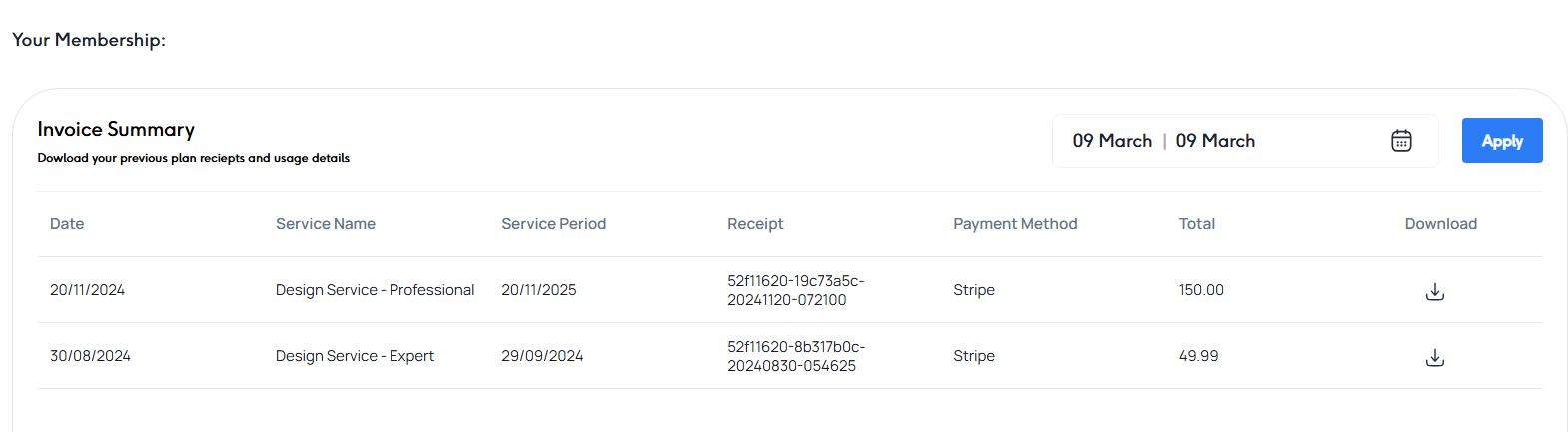
3. Invoice Filters
- You can filter your invoices by specific date ranges using the date selector in the upper-right corner of the invoice table.
- Apply the filter to view invoices for a specific period.
Steps to Access and Manage Billing Information
Additional Information
- Unsubscribing:
- You can unsubscribe from your current package, but your services will remain active until the end of the current billing period.
- Changing Plans:
- Upgrading your plan is seamless and unlocks additional features for your strategies and engines. Downgrades are not allowed to prevent inconsistencies in your strategy and engine functionality.
By using the My Billing page, users can easily keep track of their subscription details, payment history, and invoices, ensuring a smooth and transparent billing experience.



